

Collect your data. Choose your destination.
Use the Playmos SDK to capture consented gameplay, wallet and checkout activity through standard OpenTelemetry APIs. Send it to your own exporter, Collector or warehouse. No Playmos Analytics subscription is required to instrument your game or analyze your own data.
Basic studio activity counts and an interactive daily chart are included. Upgrade to Playmos Analytics for ordered conversion funnels, player exploration, repeat-purchase insights, cross-game audiences and purchases, demographic cohorts and network comparisons correlated within your authorized studio. Open Publisher Analytics and request access. Access is managed by Playmos for now; pricing and checkout are deferred. Collection consent and publisher dashboard access are separate decisions.
SDK instrumentation starts in 0.3.22. SDK 0.3.22 is published on npm. Hub deployment is a separate release; check the Hub release record for hosted availability. Currently supported analysis uses reported game events and matching studio-scoped pseudonyms. Independent cross-chain identities, verified financial receipt totals and native-engine instrumentation remain future work. Discovery source, placement and campaign context are supported when explicitly supplied. Testnet activity is never presented as verified mainnet revenue.
Choose your path#
| Your goal | Set up | Playmos Analytics required? |
|---|---|---|
| Capture SDK gameplay and commerce events | Your logger, consent decision and session context | No |
| Send events to your own backend | Your standard OTel exporter or Collector | No |
| Record your own level, tutorial or achievement events | Emit your own names through the same OTel logger | No |
| View basic studio activity | Hub source credential on your backend/Collector; authenticated studio membership | No paid access required |
| Use correlated Playmos Analytics dashboards | Same event stream, plus analytics access | Access grant required |
| Play a first-party game inside the test Hub | Choose whether to allow the Hub's gameplay analytics | Player consent required; publisher access is separate |
How collection works#
The pipeline is: your game's consent decision → SDK lifecycle instrumentation → your OTel logger and optional meter → your processor/exporter → your backend or Collector → your chosen destination. The Hub accepts the documented business events and aggregates them within the source credential's studio and game.
The SDK does not choose a backend, install a global OTel provider or secretly forward a second copy to Playmos. Supplying your own exporter gives you control over the destination. Sending data to the Hub is an explicit exporter/Collector configuration. You may keep your own copy and send the supported business-event stream to Playmos.
SDK collection is disabled by default. Events before consent are discarded; granting consent does not backfill them. Disabling or revoking collection clears unsent SDK events and cancels scheduled dispatch. Records already handed to your exporter or accepted by a server cannot be recalled by an SDK toggle. Your exporter owns batching, retries, persistence, active trace context and shutdown. Analytics must not change the result of a payment or wallet operation.
Quickstart: your own exporter#
Install SDK 0.3.24 from npm and the optional OTel implementation used in this example. Version 0.3.24 includes custom events, foreground screen timing and journey context. Existing OTel applications can reuse their provider instead. These OTel dependencies are needed for this example, not for SDK consumers who omit analytics.
npm install @playmos/sdk@0.3.24npm install @opentelemetry/sdk-logs@0.223.0 @opentelemetry/exporter-logs-otlp-http@0.223.0
import { Playmos } from '@playmos/sdk';import { LoggerProvider, BatchLogRecordProcessor } from '@opentelemetry/sdk-logs';import { OTLPLogExporter } from '@opentelemetry/exporter-logs-otlp-http';const provider = new LoggerProvider({processors: [new BatchLogRecordProcessor({exporter: new OTLPLogExporter({// Browser: an authenticated, rate-limited receiver you operate.// Backend: your own Collector or observability destination.url: 'https://telemetry.your-studio.example/v1/logs',}),maxExportBatchSize: 50,})],});const logger = provider.getLogger('your-studio.game');let session: { playerId: string; sessionId: string; chainId: number } | null = null;const playmos = new Playmos({apiKey: yourPublishableSdkKey,analytics: {logger,context: () => session,optInUI: true,onConsentChange: allowed => yourConsentManager.save(allowed),},});// Create a new session for each actual run. Use your own opaque studio pseudonym.function beginRun(studioPlayerId: string) {session = { playerId: studioPlayerId, sessionId: crypto.randomUUID(), chainId: 84532 };playmos.analytics?.gameViewed();playmos.analytics?.sessionStarted();}async function finishRun() {playmos.analytics?.sessionEnded();session = null; // retire gameplay context before any awaittry {await playmos.analytics?.flush(); // SDK queue → your OTel loggerawait provider.forceFlush(); // exporter delivery attempt} catch {// Telemetry failure must not retain a session or interrupt gameplay cleanup.}}// Existing connect/pay/enterRound/verify calls instrument their own outcomes.// Do not add a second purchase event for those same SDK results.
Wire beginRun and finishRun to your game's actual lifecycle. If you want menu visits in the game-view denominator, assign a session and call gameViewed() at the menu visit, then call sessionStarted() when play begins with the same context. Starting a session only at gameplay means your denominator covers run starts rather than every storefront visit. Collection approved midway through a run starts from that point; it does not reconstruct earlier funnel steps.
Use a fresh session ID for every run and a stable studio-scoped pseudonym across your games to enable repeat-player and audience correlation. Return null from context when collection is inappropriate. Do not use names, email addresses or wallet addresses as player IDs. The client defaults an omitted chain ID to its configured Base network; standalone instrumentation must supply its network.
Want these events turned into useful dashboards? Upgrade to Playmos Analytics for studio funnels, player profiles and correlated audiences. You can continue using your own exporter and data store.
Consent: built-in prompt or your own interface#
| Option | Behavior |
|---|---|
optInUI: true | Shows the optional accessible browser dialog; no approval means no collection |
onConsentChange(allowed) | Lets your application persist a built-in prompt decision |
customOptIn() | Reads the current decision from your own UI/consent manager; returns boolean or Promise |
refreshConsent() | Re-reads the custom manager after a choice changes |
revokeConsent() | Immediately disables collection and clears unsent SDK events |
enabled: false | Explicit collection kill switch, even if consent is approved |
customOptIn takes precedence over optInUI. Its errors fail closed. Built-in consent has no persistence or network calls. It stays disabled during server rendering and on browsers without supported modal dialogs. Closing or declining the prompt keeps collection off. Consent options work on new Playmos({ analytics: ... }) and standalone createAnalyticsInstrumentation(...).
For your own consent interface, replace the quickstart's consent options:
analytics: {logger,context: () => session,customOptIn: () => yourConsentManager.analyticsAllowed(),}// After your UI saves approval:await playmos.analytics?.refreshConsent();// On refusal, stop immediately before awaiting any persistence/network operation:playmos.analytics?.revokeConsent();await yourConsentManager.save(false);
Do not set enabled: false intending it as a temporary initial choice when using a consent option; it remains a kill switch. Without either consent option, you own the decision entirely: initialize disabled and call setEnabled(true) only after approval. Keep collection preferences available for later revocation. Gate custom events and your exporter queues with the same consent policy; the SDK cannot govern events you emit directly.
What the SDK captures#
Every SDK record has an event name, event time, INFO severity, event ID, pseudonymous player ID and gameplay session ID. Network and purchase amount are attached when applicable. It does not automatically collect player names, email, wallet balance, inventory, scores, keystrokes or chat. Scores and bounded categorical game dimensions can be explicitly supplied with customEvent(). Game code must explicitly provide context and call lifecycle hooks. Optional coarse audience attributes can be added by the host logger as described below; SDK 0.3.22 does not infer demographic fields.
| Event name | Trigger | Meaning |
|---|---|---|
playmos.game_view | gameViewed() | Your explicit game visit boundary |
playmos.session_start | sessionStarted() | Gameplay actually started |
playmos.session_end | sessionEnded() | Gameplay ended |
playmos.wallet_connect_start | SDK connect() | Wallet connection attempted |
playmos.wallet_link | Successful SDK connection | SDK observed a connection; not Hub ownership attestation |
playmos.wallet_connect_failed | Failed SDK connection | Connection did not succeed |
playmos.checkout_start | SDK pay() or enterRound() | Purchase or paid entry attempted |
playmos.checkout_failed | The SDK operation throws | Checkout call failed |
playmos.payment_pending | Returned created/pending payment | Payment is not yet reported confirmed |
playmos.payment_failed | Returned failed payment | SDK observed a failed payment state |
playmos.purchase_reported | Confirmed observed payment with valid amount | Reported spend; not independently verified Hub revenue |
verify() can update a payment previously observed by the same SDK instance. Delayed verification retains the original player/session. It does not assign an unrelated payment to whoever is playing now. Stable purchase IDs deduplicate replays. Mock commerce is excluded. Entry spend uses observed chain amount rather than assuming the requested entry price moved.
Business fields and standard shapes#
| OTel attribute | Type | Purpose |
|---|---|---|
event.id | String | Stable ID for retry deduplication |
playmos.player.id | String | Studio-scoped pseudonym |
session.id | String | One gameplay run/session |
playmos.chain.id | Number, optional | Network ID, e.g. 8453 or 84532 |
playmos.amount.micro_usdc | Positive integer string, purchases only | Atomic USDC amount; 1 USDC = 1,000,000 micro-USDC |
playmos.spend.provenance | reported, purchases only | Explicit amount provenance |
The SDK uses standard OTel eventName, timestamps, severity, body and attributes. Unix nanosecond timestamps are represented by OTLP JSON. Active trace/span correlation belongs to your OTel provider. The playmos.* fields are a documented business schema, not claimed OTel semantic conventions. Studio/game are bound by the Hub source credential rather than trusted from player-submitted fields.
IDs accepted by the Hub use 1–80 ASCII letters, digits, underscores or hyphens. A request contains at most 50 business events; a game is limited to 1,000 events/minute. Backfill is limited to 90 days, with one minute of future clock skew. These ingestion bounds are not a retention/deletion guarantee. The SDK queue and payment correlation map are bounded; a durable outbox belongs in your backend/Collector.
Custom game events and foreground screen time#
SDK 0.3.24 adds custom game events to the same consented queue, standard OTel logger and optional meter used for lifecycle events. Keep your own exporter, send the supported stream to Hub, or do both. These methods require SDK 0.3.24 or later.
// After creating Playmos with analytics logger/context and obtaining consent:playmos.analytics?.customEvent('tutorial_completed', {tutorial_id: 'movement',attempt: 1,succeeded: true,});playmos.analytics?.customEvent('run_ended', {mode: 'practice',score: 120,reason: 'death',}, { id: 'stable_event_id_for_this_action' });// On actual screen transitions, not on every render:playmos.analytics?.screenViewed('gameplay');// At the end of a run or screen:playmos.analytics?.screenEnded();await playmos.analytics?.flush();
customEvent returns false when collection is disabled, context is unavailable, the queue is full, or data is invalid. Names use 1–64 lowercase letters, digits, underscores or periods, starting with a letter; the playmos. prefix is reserved. Supply at most 16 flat attributes. Attribute keys are 1–40 lowercase letters, digits, underscores or periods, starting with a letter. Values can be booleans, finite numbers between -1e12 and 1e12, or 1–80 character opaque categorical tokens using letters, digits, underscores, periods or hyphens. Nested objects, arrays, emails, URLs and free text are rejected. Do not use tokens to encode names, secrets or other identifying information. An ID must identify one action; reuse it only to retry that same action.
Records use eventName playmos.custom, playmos.custom.name, and playmos.custom.attr.<key> attributes. The counter keeps its event.name label at playmos.custom; custom names, players and property values never become Prometheus labels. The lower-level createAnalytics collector accepts type custom with custom: { name, attributes } under the same validation rules.
screenViewed opens one interval and closes the previous screen. In browsers, time accumulates only while the document is visible and has focus. Hidden tabs and unfocused windows are excluded. screenEnded, a later screenViewed, sessionEnded or pagehide closes the interval and emits screen_time with screen_id and duration_ms. Consent revocation discards an open interval and clears queued records. Context is captured at interval start, so another player/session cannot inherit its duration. Native hosts should send their own foreground duration with customEvent. Browser unload delivery is best effort; this is not session replay or a guarantee of attention. Call screenEnded before disposing your integration.
Hub accepts this bounded custom profile through the existing trusted ingestion routes. Game behavior shows foreground gameplay duration, recorded screens, event counts and the latest 20 custom arrivals. Only closed intervals contribute time; refresh after finishing a run or changing screens. Fields that were never supplied remain unavailable. Arbitrary events emitted directly through an OTel logger can still go to your own destination; filter unsupported records out of the Hub pipeline.
Custom funnels#
With Playmos Analytics access, publishers can save up to 20 studio-scoped funnels in Game behavior → Saved funnels. Choose 2–8 distinct supported lifecycle/custom event steps and a 1–1440 minute conversion window. Saved funnels appear in the Conversion journey selector. The API is POST /api/publisher/analytics/funnels with name, steps and windowMinutes; custom step keys use custom:<event_name>. DELETE /api/publisher/analytics/funnels/:id removes one studio-owned definition. Creating and deleting require studio edit permission; read-only members can inspect accessible reports.
Each funnel counts a game/player/session once and starts at its first matching entry in the selected UTC period. Subsequent steps must occur in order, in that same game/player/session and within the configured window. Counts are deduplicated by event ID, not by action name. Equal timestamps use configured step order. The report shows entry conversion, drop-off counts and median elapsed time from entry. A run-ended event indicates an observed end, not a win. Funnels do not join sessions or games into an assumed journey, and incomplete telemetry is not proof of abandonment. The built-in Run → end funnel uses run_started → run_ended with a 30-minute window.
Journey context#
Journey context is added in SDK 0.3.24. SDK 0.3.24 is published on npm; Hub deployment remains a separate release. The new fields are optional, so existing integrations continue to work. No context is collected before consent, and revocation invalidates in-flight SDK attribution so an old checkout cannot resume under a later consent decision.
Add bounded, opaque business identifiers to context().journey. These values describe an observed association, not independently verified attribution or experimental lift:
context: () => session ? {...session,journey: {source: 'studio_launch',campaignId: 'campaign_spring',placementId: 'home_featured',gameVersion: '1.4.0',offerId: 'starter_pack',experimentId: 'starter_offer_test',variantId: 'control',},} : null,
| Journey property | Standard OTel attribute | Meaning |
|---|---|---|
| source | playmos.attribution.source | Supplied discovery/source code |
| campaignId | playmos.attribution.campaign_id | Opaque campaign identifier |
| placementId | playmos.attribution.placement_id | Placement code |
| referrerGameId | playmos.attribution.referrer_game_id | Supplied referring game ID |
| gameVersion | playmos.game.version | Actual game release version |
| offerId | playmos.purchase.offer_id | Offer identifier, not a product description |
| experimentId / variantId | playmos.experiment.id / playmos.experiment.variant_id | Supplied assignment; does not create an experiment or prove exposure |
| attemptId | playmos.purchase.attempt_id | SDK-generated fresh checkout-attempt ID |
| failureReason | playmos.failure.reason | Code-derived cancelled, insufficient_funds, network, invalid_input or unknown |
| elapsedMs | playmos.operation.elapsed_ms | SDK-measured elapsed time from checkout start to the observed result |
| paymentId | playmos.payment.id | SDK-observed payment reference |
| transactionHash | playmos.transaction.hash | Observed 32-byte EVM transaction hash |
| serviceVerification | playmos.payment.service_verification | Reported service chain/cache/degraded observation; not Hub verification |
| feeMicro / netMicro | playmos.payment.fee_micro_usdc / playmos.payment.net_micro_usdc | Reported response values in integer micro-USDC |
Opaque values allow 1–80 ASCII letters, digits, underscores, dots or hyphens. Never put URLs, emails, names, raw referrers or error messages in these fields. Elapsed time is an integer from 0 to seven days. Fee/net values allow zero and up to 16 digits. Transaction hashes must be 0x plus 64 hexadecimal digits. The SDK copies context at operation start and carries it through delayed results; malformed context is not emitted. Each SDK pay/enterRound call creates a fresh attempt ID, even when the underlying payment is an idempotent replay. Purchase event IDs remain stable for deduplication. A payment keeps its first captured attribution within the same consent period.
The Hub persists supported context after strict validation. Browser integrations remain untrusted: supplied transaction references and a reported service chain observation never increase verified revenue. The Hub does not yet independently reconcile receipts, collect refund histories or establish net revenue. Custom fields outside this schema stay in your own exporter pipeline.
First-party Hub game links supply discovery/detail placement codes; direct entry is labeled hub_direct. These labels describe entry routes, not marketing attribution. The Hub never captures raw query strings or browser referrer URLs. SDK game version and campaign/offer/experiment IDs require the developer to supply actual values; missing values remain missing.
Paid Journey intelligence presents source coverage, observed source session/purchase counts, linked checkout outcomes, code-based failure categories, supplied outcome timing and reported transaction-evidence coverage. An attempt is eligible only when its checkout start is present in the selected window, scoped to the same game/player/session/attempt ID. A later observed purchase supersedes a reported failure. Unresolved does not mean abandoned. Source counts are associations, not ordered conversion or incremental lift. References, experiment assignment and timing are not proof of exposure or causation. Free basic analytics does not return these fields or premium rollups.
Audience and demographic dimensions#
Playmos Analytics supports consented, reported language/locale and device class, plus supplied country and age band. Hub-embedded first-party games add locale and a coarse device category after consent; the raw user agent is not stored. Locale is not proof of country. Countries and ages are not inferred from wallets, names or purchasing behavior. External studios can add these optional dimensions through a standard logger wrapper:
const analyticsLogger = {emit(record: Parameters<typeof logger.emit>[0]) {if (!yourConsentManager.analyticsAllowed()) return;const audience = yourConsentManager.approvedAudienceFields();logger.emit({...record,attributes: {...record.attributes,...(audience.locale ? { 'playmos.audience.locale': audience.locale } : {}),...(audience.device ? { 'playmos.audience.device': audience.device } : {}),...(audience.country ? { 'playmos.audience.country': audience.country } : {}),...(audience.ageBand ? { 'playmos.audience.age_band': audience.ageBand } : {}),},});},};// Use analyticsLogger as the SDK analytics.logger. Keep your existing exporter.
This wrapper assumes synchronous consent/profile getters; resolve an asynchronous manager before capturing. Only return fields covered by the player's consent. These are OTel attributes added by the host, not extra SDK 0.3.22 context properties.
| Optional attribute | Accepted values | Source |
|---|---|---|
playmos.audience.locale | Language tag such as en-US; bounded language/script/region segments | Consented reported browser/app locale |
playmos.audience.device | mobile, tablet, desktop, other | Consented coarse device classification |
playmos.audience.country | Two uppercase letters, such as US | Supplied country code; not guessed from locale |
playmos.audience.age_band | under18, 18-24, 25-34, 35-44, 45-54, 55+ | Supplied broad age band; no exact date of birth |
The paid dashboard shows distinct-player cohort counts, paying-player share and reported purchase occurrences for these dimensions. A cohort needs at least five distinct players to be shown. Repeated events do not inflate cohort membership. Coverage counts show how many players have a supplied dimension; missing values remain missing. Within the selected window, the most recently supplied value per player/dimension determines cohort membership. These are observed studio cohorts, not inferred population demographics or proof of identity. Custom-event streams and identifying/free-form profile fields are not automatically accepted into Hub analytics.
Connect the supported stream to Playmos Analytics#
An authorized publisher can create or rotate a game-scoped source key from Publisher Analytics → Connect your SDK data. Provisioning and consented collection remain available while dashboard access is locked or expired. Rotating a key revokes its predecessor. Keep the source key on your trusted backend or Collector; never put it into a browser bundle, game URL or public environment variable. It is separate from your SDK publishable key.
On a trusted backend, select the official HTTP/JSON exporter:
const exporter = new OTLPLogExporter({url: `${hubOrigin}/api/analytics/v1/logs`,headers: { Authorization: `Bearer ${serverOnlySourceKey}` },});// Supply exporter to your BatchLogRecordProcessor, maxExportBatchSize: 50.
Your browser receiver must enforce consent, validate session/player attribution and game membership, authenticate appropriately and rate-limit before forwarding. Treat all client events and amounts as untrusted. A source key limits the studio/game; it does not prove that an event or transaction is true. Preserve event IDs so retried delivery deduplicates.
The Hub directly accepts OTLP/HTTP JSON logs, without compression, for this profile. It does not directly implement protobuf, gRPC or gzip. A standard Collector can accept those transports upstream and export supported JSON to the Hub. /api/analytics/events remains a compatibility route. No proprietary Playmos exporter is required.
Collector routing and keeping your own copy#
Use separate pipelines for arbitrary OTel records and the filtered Playmos lifecycle/custom profile, or share the supported profile across both exporters. Here is the Hub exporter/batch portion for a trusted Collector; attach it to the supported-events logs pipeline and retain your own exporter on that pipeline if desired:
processors:batch/playmos:send_batch_size: 50send_batch_max_size: 50exporters:otlp_http/playmos:endpoint: ${env:PLAYMOS_HUB_ORIGIN}/api/analyticslogs_endpoint: ${env:PLAYMOS_HUB_ORIGIN}/api/analytics/v1/logsencoding: jsoncompression: noneheaders:Authorization: Bearer ${env:PLAYMOS_ANALYTICS_SOURCE_KEY}sending_queue:enabled: trueretry_on_failure:enabled: true
This is a configuration fragment, not a complete Collector deployment. Choose receivers, authentication, filters and your other exporters for your installation. Each Hub source key binds one game: partition game streams into matching pipelines. Do not forward unrelated logs or PII. Collector configuration is documented; an actual deployed Collector has not been validated in this release. The official JS exporter has been exercised end to end with the Hub.
How metrics and funnels are calculated#
Basic analytics is available to authenticated studio members without an Analytics access grant. /api/publisher/analytics/basic accepts days and optional gameId and returns active-player, game-view, started-session and paying-player counts plus daily player/session/view trends. It never returns player/session IDs, spend amounts, purchase overlap, ordered funnels or demographic dimensions. Basic session counts do not imply ordered funnel conversion.
The paid dashboard selects a 7/30/90-day UTC window, studio, optional game and optional network. Analysis reads at most 100,000 events per window; player exploration shows up to 100 players. Windows above the event limit return 422 and require a shorter period or one game; they are not silently truncated. IDs are correlated only inside the authorized studio.
| Funnel | Ordered stages in the same game/player/session |
|---|---|
| Game → purchase | Game viewed → session started → checkout started → purchase reported |
| Checkout → purchase | Checkout started → purchase reported |
| Connect → linked | Wallet connect started → wallet linked |
| Full wallet journey | Game viewed → session started → wallet linked → checkout started → purchase reported |
Wallet connection is optional in the game→purchase funnel. Steps must be in order and inside the selected window; equal timestamps use stage order. Conversion is the final ordered stage's session count divided by the first stage's session count, not the ratio of unrelated raw event counters. A zero denominator displays an unavailable rate. Omitting lifecycle predecessors or rotating the session mid-checkout changes funnel completeness.
Repeat players have multiple observed game sessions. Purchase intelligence counts reported purchases, players with repeated purchases, players purchasing in multiple games and shared buyers for pairs of games. Cross-game purchase overlap reports the shared buyers and their share of the smaller payer audience. Audience overlap matches the supplied studio pseudonym across games and reports shared players plus their share of the smaller audience. Network analysis compares reported activity for tagged chains. It does not independently link wallets on different chains. SDK commerce supports Base/Base Sepolia; other chains require your external telemetry and do not gain payment support from an analytics tag.
Reported spend totals atomic purchase amounts. Whale segments mean at least 1,000 reported USDC, and high spenders at least 100, in the selected period/network. These are spender segments, not wallet balance or net worth. Select one network for spend charts/segments; multi-network views separate network totals instead of blending amounts. Verified spend remains unavailable until receipt validation is connected.
Prometheus-compatible counters#
Supply an optional standard OTel meter in analytics configuration. The SDK creates the monotonic counter playmos.analytics.events, unit {event}, with bounded event.name labels. Configure your own metric reader/exporter or Collector to expose Prometheus-compatible metrics. Player, session and wallet identifiers are not counter labels. SDK emitted-event counts and Hub accepted-event counts are different stages and need not match during retries or failures.
The Hub's protected /api/admin/analytics/metrics exposes standard Prometheus text via its maintained Prometheus client:
| Counter | Labels | Meaning |
|---|---|---|
playmos_analytics_events_total | event_type, outcome | Durable accepted/duplicate ingestion counts |
playmos_analytics_funnel_steps_total | step | Accepted occurrences of funnel stages |
Scrape using an internal session or a server-only HUB_ANALYTICS_METRICS_TOKEN of 32–256 characters. Source credentials cannot read operational metrics. Counter values persist across Hub restarts. Funnel-stage occurrences are not unique sessions or conversion rates; use ordered dashboard analysis for those.
Hub-embedded first-party games and access#
Base Munch, Base Jump and Base Stack inside the Hub use an origin-bound game-to-parent bridge. The parent retains the consent choice in an HttpOnly cookie, issues short-lived game-bound browser sessions and exports through official OTel. No source key is exposed to the game. Game lifecycle and SDK commerce observations are attributed to the bound studio pseudonym/session. Turning analytics off immediately stops local collection and invalidates browser sessions. Standalone game pages do not use this Hub consent bridge.
Basic analytics appears first for external studio members: actual aggregate counts and an interactive daily chart, including honest zero states. Internal members can read the advanced package; external publishers require a studio access grant for paid correlations, ordered funnels, player exploration and demographic cohorts. The paid /api/publisher/analytics endpoint returns 402 without access. Free pages call the basic endpoint and do not fetch paid data to hide behind CSS. Premium examples use blurred decorative placeholders, especially when empty. Upgrade requests show an access placeholder and never take payment.
Verify your integration#
- With collection disabled or consent declined, start a game and confirm your exporter receives no SDK analytics.
- Approve consent, assign a valid studio pseudonym/session and call game view/start/end at their real boundaries. Inspect the supported event names and IDs at your own receiver.
- Flush the SDK queue, then your OTel provider. These are separate operations; a successful SDK flush alone is not proof of server delivery.
- If forwarding to Playmos, confirm source/game binding, HTTP ingestion responses and basic aggregates with studio membership and advanced dashboards using authorized access. Preserve IDs when replaying; repeated purchase observations should not increase accepted purchases.
- Revoke consent before awaiting persistence, then confirm no new records leave the SDK. Test rapid allow/off changes and consent-store failures.
- Verify game/network filters and funnel predecessors. Keep testnet, reported spend and verified revenue distinctions visible.
Troubleshooting#
| Symptom | Check |
|---|---|
| No SDK events | Consent approved? enabled: false kill switch? Context returning null? Mock SDK? Lifecycle hooks called? |
| SDK queue flushed but Hub is empty | Provider flushed? Exporter URL/auth correct? Receiver responses? Valid supported event batch? |
| Ingestion 401/403 | Server-only source key valid for the game? Browser consent/session still valid? Origin policy? |
| Ingestion 400/429 | Fields/event names/batch size/timestamps/amount valid? Game rate limit exceeded? |
| Advanced dashboard 402 | Request Playmos Analytics access; basic studio aggregates and consented collection remain available |
| Funnel drops before purchase | Same game/player/session? Predecessors emitted and ordered inside the window? Network tags consistent? |
| Custom events rejected by Hub | Keep them in your own pipeline; Hub accepts the documented business profile |
| Reported purchases absent on verification | This SDK instance must have observed the original payment/context; unrelated verification is not attributed |
Upgrade to Playmos Analytics to turn supported events into cross-game and purchase correlations, ordered funnels, player profiles and consented demographic cohorts while keeping your own telemetry stack. Request publisher analytics access. Pricing, checkout and additional verified correlations will be documented when available.
References: OpenTelemetry logs data model, JavaScript exporters, Collector HTTP exporter, Prometheus instrumentation.
Read the reports#
Overview shows activity, ordered gameplay conversion and retention. Behavior shows visible, focused screen time, custom events and saved funnels. Purchases shows reported purchase quality and discovery/checkout friction. Audience shows player profiles and studio-scoped cross-game overlap. All charts support light and dark themes; reports and tables remain scrollable on small screens.
Retention uses consented play starts, the first recorded play in stored history and exact later UTC days. D1, D7 and D30 exclude incomplete follow-up days. A dash means the cohort is not mature; zero means no observed return among eligible players. Players who disable collection are not counted as observed returns. These are observed cohorts, not a census of your audience.
Screen duration counts visible, focused intervals closed by a screen change, session end or page exit. It excludes background time. Active play time covers the gameplay screen only. An open interval is not a live heartbeat and may be lost on abrupt browser termination. Purchase amounts are reported USDC values, not verified receipts. Spend per buyer covers the selected period, not lifetime value; mixed-network amounts are not combined into that summary.
First-party game capture#
Munch, Jump and Stack use the shared game kit with the SDK instrumentation. Each consented run has its own session. The integration reports run_started, run_ended with mode/score/reason, run_exited when a run shuts down without a recorded outcome, and home/ready/gameplay/results screen transitions. SDK wallet and purchase outcomes retain their standard lifecycle events. Practice does not invent a payment.
To check your integration, allow analytics in the Hub, open a game and start free practice (the P shortcut is also available). Finish or exit a run, then inspect Behavior → Events and Overview → Run → end. Decline or revoke consent and repeat: no new gameplay records should arrive. The dashboard access gate does not determine collection consent.
From game events to publisher reports#
These screenshots show actual consented practice sessions from Munch, Jump and Stack in a disposable local Hub. They illustrate the SDK 0.3.24 integration; they are not proof of hosted availability or verified revenue.
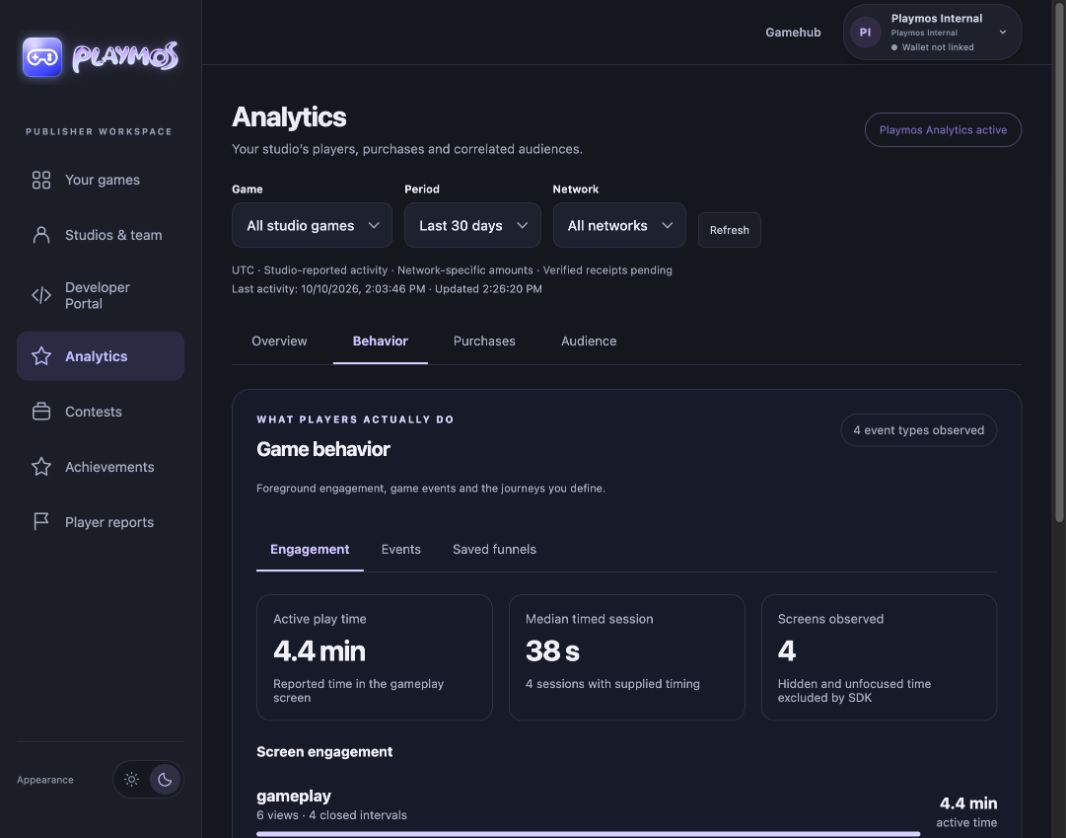
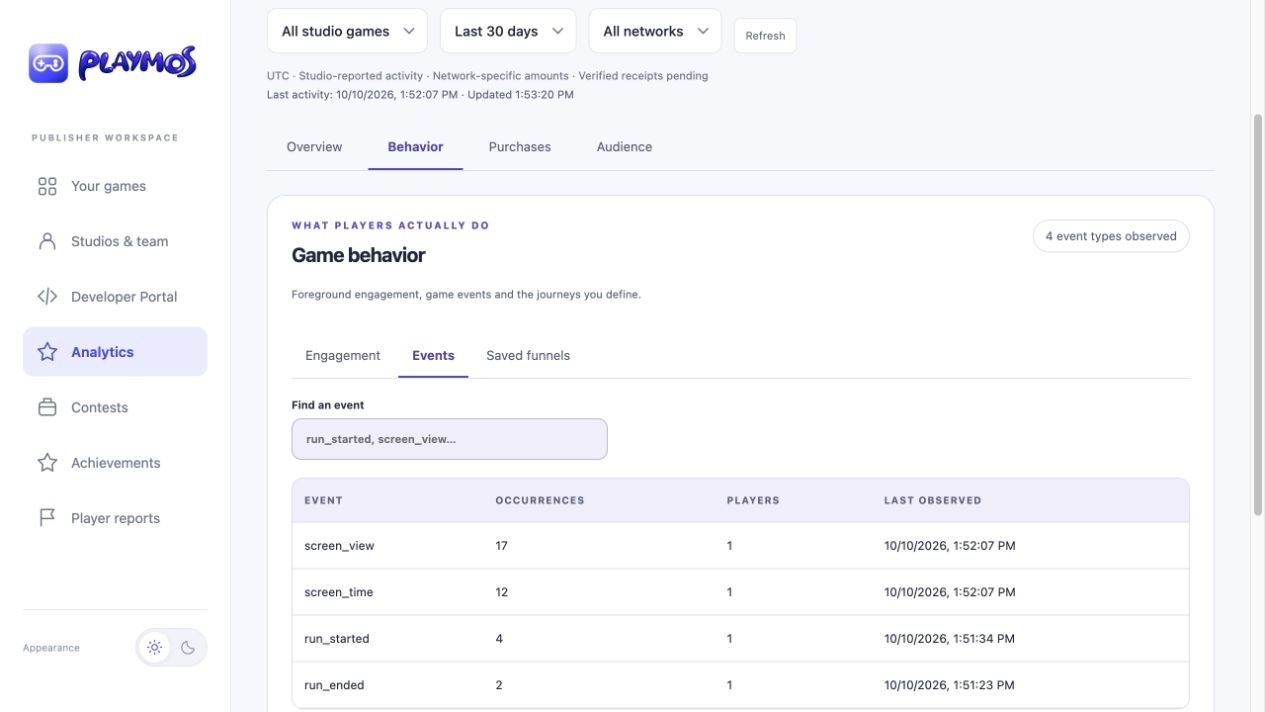
In your publisher workspace, select a game and period, then open Behavior to inspect engagement, events or saved funnels. Choose Overview for conversion and retention. Basic activity is available to studio members; correlated reports require Playmos Analytics access.